All Raspberry Pi Pico variants explained: which one to buy and why
Raspberry Pi Pico boards are microcontroller development boards (not Linux computers).
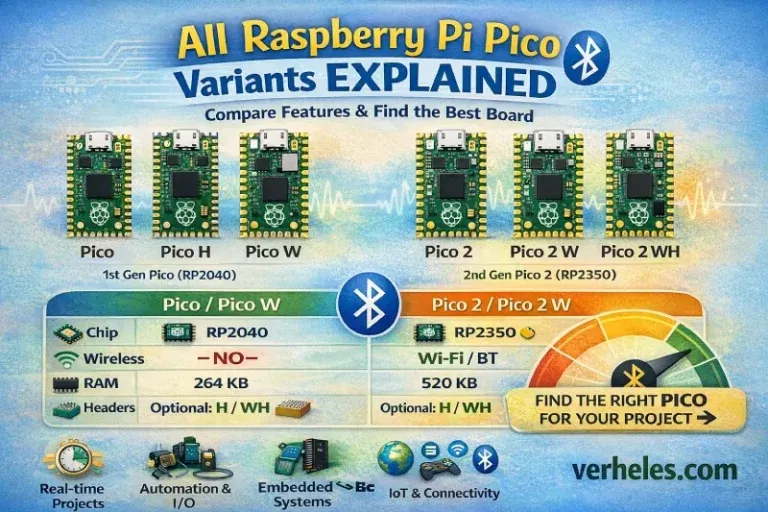
Raspberry Pi Pico boards are microcontroller development boards (not Linux computers). They shine in real-time control, sensors, robotics, LED projects, small IoT devices, and embedded automation—especially when you want deterministic timing and low power. The Pico “family” is mainly split by chip generation (RP2040 vs RP2350), wireless vs non-wireless, and whether the board ships with pre-soldered headers.
Quick comparison table (Pico 1 vs Pico 2 families)
| Parameter | Pico (RP2040) | Pico 2 (RP2350) |
|---|---|---|
| Generation | Pico (1st gen) | Pico 2 (2nd gen) |
| MCU | RP2040 | RP2350 |
| CPU architecture | Dual-core Arm Cortex-M0+ | Dual-core Arm Cortex-M33 (and optional RISC-V cores depending on build/toolchain) |
| Typical clock | Up to ~133 MHz | Up to ~150 MHz |
| SRAM (RAM) | 264 KB | 520 KB |
| On-board flash (typical) | 2 MB | 4 MB |
| Wireless | W models only | W models only |
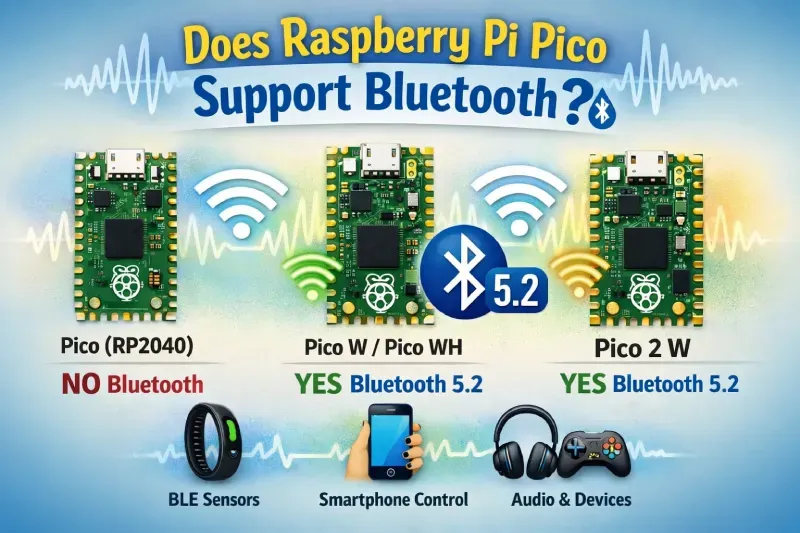
| Bluetooth | W models only | W models only |
| PIO (Programmable I/O) | Yes (a major RP2040 strength) | Yes (similar concept; ecosystem still newer) |
| Logic level | 3.3V | 3.3V |
| Power options | 5V via USB / VSYS input range (varies by setup) | Similar concept: USB + VSYS |
| Form factor | Classic Pico footprint | Very similar footprint, aimed at compatibility |
| Best use cases | Lowest cost, huge ecosystem, timing/PIO projects | More headroom (RAM/speed), bigger projects, “future-proofing” |
| Choose it when… | You want proven tutorials/libraries and low cost | You need more RAM/performance or want the newer platform |
Key specs for Pico 1 and the existence of H/W/WH are documented by Raspberry Pi.
Key specs and positioning for Pico 2 (including dual-architecture and wireless for Pico 2 W) are on Raspberry Pi’s product page and docs.
Flash size note (Pico 2 W): the official Pico 2 series product brief lists 4 MB on-board QSPI flash, but at least one Pico 2 W datasheet edition mentions 2 MB. If you’re building a product (or storing large assets in flash), verify your exact board revision and its datasheet.
One paragraph on each variant (what’s special about it)
Raspberry Pi Pico (RP2040)
The original Pico is the “default recommendation” for most beginners and many pros: it’s inexpensive, widely supported, and excellent for timing-critical work thanks to Raspberry Pi’s PIO (Programmable I/O) subsystem. It’s ideal when you don’t need wireless and want the broadest compatibility with tutorials, libraries, and add-ons.
Raspberry Pi Pico H
Pico H is essentially a Pico designed for convenience: it ships with pre-soldered 0.1” headers so it can drop straight into a breadboard. Raspberry Pi’s docs also note a different, keyed SWD debug connector arrangement compared to the plain Pico
Raspberry Pi Pico W
Pico W adds wireless connectivity while keeping the Pico 1 form factor and RP2040 ecosystem. It’s built for IoT: Wi-Fi projects, simple web dashboards, remote sensors, and integrations like Home Assistant / MQTT. Raspberry Pi lists onboard 2.4 GHz 802.11n Wi-Fi and Bluetooth 5.2 for Pico W.
Raspberry Pi Pico WH
Pico WH is simply Pico W plus pre-soldered headers—a great “plug-and-play” wireless option when you want to move fast and avoid soldering.
Raspberry Pi Pico 2 (RP2350)
Pico 2 is the next generation: more performance, more RAM, and a modern security story. Raspberry Pi highlights higher clock, double the memory, stronger cores (Cortex-M33), and “optional RISC-V cores,” while staying compatible with earlier Pico projects.
Raspberry Pi Pico 2 (with headers)
Like Pico H, this is a convenience version: same Pico 2 hardware, but shipped with headers already soldered, making it easier for education and rapid prototyping. Raspberry Pi’s documentation explicitly calls out “Pico 2 with headers.”
Raspberry Pi Pico 2 W
Pico 2 W brings wireless to the RP2350 platform: Raspberry Pi describes it as Pico 2 plus 2.4 GHz 802.11n Wi-Fi and Bluetooth 5.2, aimed at expanding IoT and smart device designs. If you want the most headroom for connected projects in the Pico lineup, this is usually the one.
Raspberry Pi Pico 2 W (with headers)
Same idea as WH: wireless + convenience. It’s excellent for classroom kits, quick breadboard builds, and prototypes that need Wi-Fi/BT without any soldering step.
Where these boards come from (who made them, where they were designed, and where they’re built)
The Raspberry Pi Pico boards are developed by Raspberry Pi Ltd, which designed the RP2040 (Pico / Pico W) and later the RP2350 (Pico 2 / Pico 2 W) in-house. Raspberry Pi has written about building its silicon/ASIC team in Cambridge, UK, and even explicitly notes RP2040 was developed there.
On the manufacturing side, Raspberry Pi’s launch post thanks Sony Pencoed (Wales, UK) and Sony Inazawa (Japan)for helping bring the Pico projects to production.
At the chip level, Raspberry Pi documents that RP2040 and RP2350 are manufactured on a 40nm process node, and Raspberry Pi’s own Pico W announcement mentions RP2040 being built on TSMC’s 40nm low-power process.
Release dates / timeline (official announcements)
- January 21, 2021 — Raspberry Pi Pico launches (RP2040-based).
- June 30, 2022 — Pico W (wireless) and Pico H (pre-soldered headers) launch; Raspberry Pi states Pico WHwould follow in August 2022.
- August 8, 2024 — Raspberry Pi Pico 2 launches (RP2350-based).
- November 25, 2024 — Pico 2 W is announced publicly as the wireless version of Pico 2 (Wi-Fi + BT 5.2).
Final comparison: which Pico should you choose?
Pick Pico 1 (RP2040) when:
- You want the cheapest option and the biggest ecosystem of examples.
- Your project is timing-critical but not memory-heavy.
- You don’t need the added security/performance of Pico 2.
Pick Pico W / WH when:
- You need Wi-Fi/Bluetooth for IoT sensors, small dashboards, or cloud/local integrations.
- Choose WH specifically if you want to skip soldering.
Pick Pico 2 (RP2350) when:
- You want more RAM and speed, and you like the idea of newer security features and the dual-architecture story (Arm + RISC-V option).
- Your MicroPython/C/C++ project is growing and memory is becoming tight.
Pick Pico 2 W when:
- You want “best overall” for connected projects: modern Pico 2 platform + wireless.
- You’re building serious IoT prototypes and want headroom.
Headers or not?
If you’re using breadboards and prototyping fast, buy the header version. If you’re soldering into a finished device or carrier PCB, the non-header version is cleaner and often easier to integrate.
Comments ()