An Affordable Ubiquiti UniFi Home Network for Chicago
Ubiquiti UniFi setup designed for a two-story private home in the Chicago area. This is not just a security system — it is a professional-grade home Wi-Fi network, with one wired camera added as a basic, essential option that I believe every modern home should have.
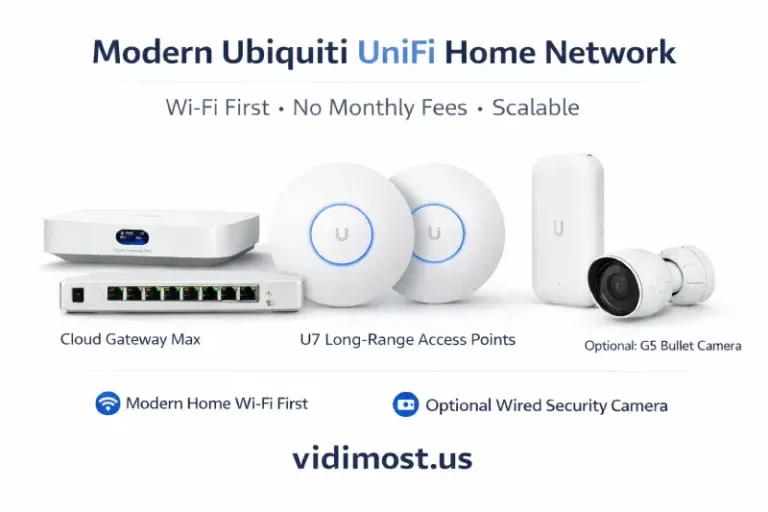
A Modern Wi-Fi System with a Basic Security Camera Option — No Monthly Fees
Introduction
For most homeowners in Chicago, the foundation of a modern home is a fast, stable, and well-designed Wi-Fi network. Security cameras are no longer a luxury either, but they should be an option, not the core of the system or a reason to pay monthly fees forever.
In this article, I’ll describe a practical and affordable Ubiquiti UniFi setup designed for a two-story private home in the Chicago area.
This is not just a security system — it is a professional-grade home Wi-Fi network, with one wired camera added as a basic, essential option that I believe every modern home should have.
What Problem This System Solves
Many homes still depend on:
- All-in-one consumer routers with weak coverage
- Mesh systems that struggle with brick walls and multiple floors
- Battery cameras that miss events or need constant maintenance
- Cloud services with growing monthly fees
This UniFi-based design solves those issues by focusing first on a strong wired network and Wi-Fi foundation, then adding video surveillance as a simple, reliable option.
System Overview: A Modern Home Wi-Fi First, Security Second
This configuration is built around a properly designed Wi-Fi network, not cameras.
The camera is simply an add-on that uses the same wired infrastructure.
Core Design Principles
- Wired PoE connections for reliability
- Professional Wi-Fi coverage on every floor
- Local video recording (no subscriptions)
- Extra capacity for future devices
Recommended Ubiquiti Equipment
Network Gateway, Controller & Recording
- Ubiquiti UniFi Cloud Gateway Max (UCG-Max, 512 GB)
Price: $279 (official Ubiquiti store, no tax, no shipping)
This device serves as:
- The main home router
- UniFi Network controller
- UniFi Protect video recorder
The built-in 512 GB storage is more than enough for one camera using motion-based recording, eliminating the need for a separate NVR or SSD.
PoE Switching
- Ubiquiti UniFi Switch Lite 8 PoE (USW-Lite-8-PoE)
This switch powers:
- 3 Wi-Fi access points
- 1 security camera
It also leaves additional PoE and non-PoE ports available for future expansion — more cameras, access control, or other smart home devices.
Wi-Fi Coverage (The Core of the System)
- 2 × Ubiquiti UniFi U7 Long-Range (U7-LR)
Installed indoors:- One per floor
- Positioned near the center of the house
- 1 × Ubiquiti UniFi U7 Outdoor
Installed outside to cover:- Patio
- Backyard
- Outdoor work and entertainment areas
This layout provides strong, consistent Wi-Fi coverage, which is especially important for Chicago homes with brick construction and multiple floors.
Basic Video Camera (Optional but Essential)
- Ubiquiti UniFi G5 Bullet Camera (UVC-G5-Bullet)
Installed on the front of the house to monitor:
- Main entrance
- Garage
- Package deliveries
The camera is fully wired, powered via PoE, and records locally — no batteries, no cloud subscriptions.
Equipment Cost Breakdown (Official Pricing)
All prices below are based on the official Ubiquiti online store, excluding tax and shipping.
| Component | Price |
|---|---|
| Cloud Gateway Max (512 GB) | $279 |
| UniFi Switch Lite 8 PoE | $109 |
| 2 × UniFi U7 Long-Range | $318 |
| UniFi U7 Outdoor | $199 |
| UniFi G5 Bullet Camera | $129 |
| Total Equipment Cost | $1,034 |
Additional Required Materials
- Cat6 Ethernet cable — 500 ft
Estimated cost: ~$120
This is typically sufficient for:
- Three access points
- One camera
- Clean cable routing in a two-story private home
Installation & Labor
Installation and configuration are not included in the equipment price.
Professional installation covers:
- Running and terminating Cat6 cable
- Proper placement of access points
- Camera mounting and alignment
- UniFi Network and Protect configuration
Correct installation ensures maximum Wi-Fi performance, stable PoE power, and long-term scalability.
Why This Setup Makes Sense for Chicago Homes
- Designed as a modern Wi-Fi network first
- Security camera is a simple, practical option
- No monthly fees
- Wired reliability
- Excellent indoor and outdoor coverage
- Easy expansion in the future
About the Ubiquiti Brand
Ubiquiti is a U.S.-based technology company known for building professional networking and security equipment used worldwide in homes, offices, and large-scale deployments.
The UniFi platform brings enterprise-grade networking concepts — such as PoE, centralized controllers, and structured Wi-Fi design — into residential environments without mandatory subscriptions. This approach makes Ubiquiti an ideal choice for homeowners who want long-term reliability and control over their infrastructure.
Conclusion
This Ubiquiti UniFi home setup is not just a security solution — it is a proper modern home network, with a basic wired camera added where it truly matters.
When designed and installed correctly, this system delivers:
- Excellent Wi-Fi performance
- Reliable local video recording
- No recurring fees
- A solid foundation for the future
Need Professional Design or Installation?
If you need help with:
- UniFi system design
- Equipment selection
- Professional installation
- Future expansion planning
Contact me via https://vidimost.us
At Vidimost LLC, I design and install modern Ubiquiti UniFi networks for private homes and small businesses across the Chicago area.

Comments ()