Best Ubiquiti Cloud Gateway for Chicago Home & Small Office
Chicago-focused comparison of Ubiquiti Cloud Gateway Ultra, Pro, and Fiber—what to buy for Wi-Fi reliability, VLAN/VPN, UniFi Protect cameras, UniFi Access doors, and future 10G/fiber upgrades.
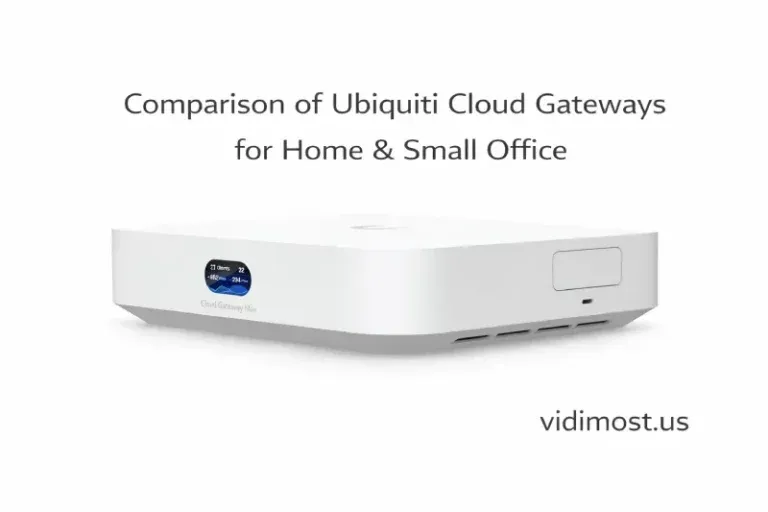
Chicago & Suburbs — Expert Comparison and Recommendations
Choosing the right Cloud Gateway is the foundation of a reliable network for your home, condo, or small office in Chicago and surrounding suburbs. A properly selected gateway determines not only internet speed and Wi-Fi stability, but also how easily you can add security cameras, access control, and future upgrades.
In this guide, we compare three professional Cloud Gateway models from Ubiquiti and explain which one is right for your property:
- Cloud Gateway Ultra
- Cloud Gateway Pro
- Cloud Gateway Fiber
This page is written for real-world deployments — not lab tests — based on installations across Chicago, the North Shore, and nearby suburbs.
What All Ubiquiti Cloud Gateways Have in Common
All Cloud Gateways share the same professional UniFi foundation. No matter which model you choose, you get the following core capabilities:
Enterprise-Grade Networking
- Business-class router and firewall
- VLAN support for secure network segmentation
(work devices, guests, IoT, cameras) - Guest Wi-Fi with captive portal
- Traffic prioritization (QoS)
- Deep traffic analytics (DPI)
Security & Remote Access
- Built-in VPN (WireGuard, Site-to-Site, remote access)
- No monthly fees or subscriptions
- Secure cloud access for remote management
Professional Wi-Fi Management
- Works with all UniFi Access Points
- Supports small apartments to large homes and offices
- Centralized control of all Wi-Fi devices
Centralized UniFi Management
- UniFi OS with a single dashboard
- Designed for long-term scalability
- Suitable for residential and commercial environments
Key takeaway:
A Cloud Gateway is not a consumer router — it is the control center of a professional network.
Key Differences: Which Cloud Gateway Should You Choose?
Cloud Gateway Ultra
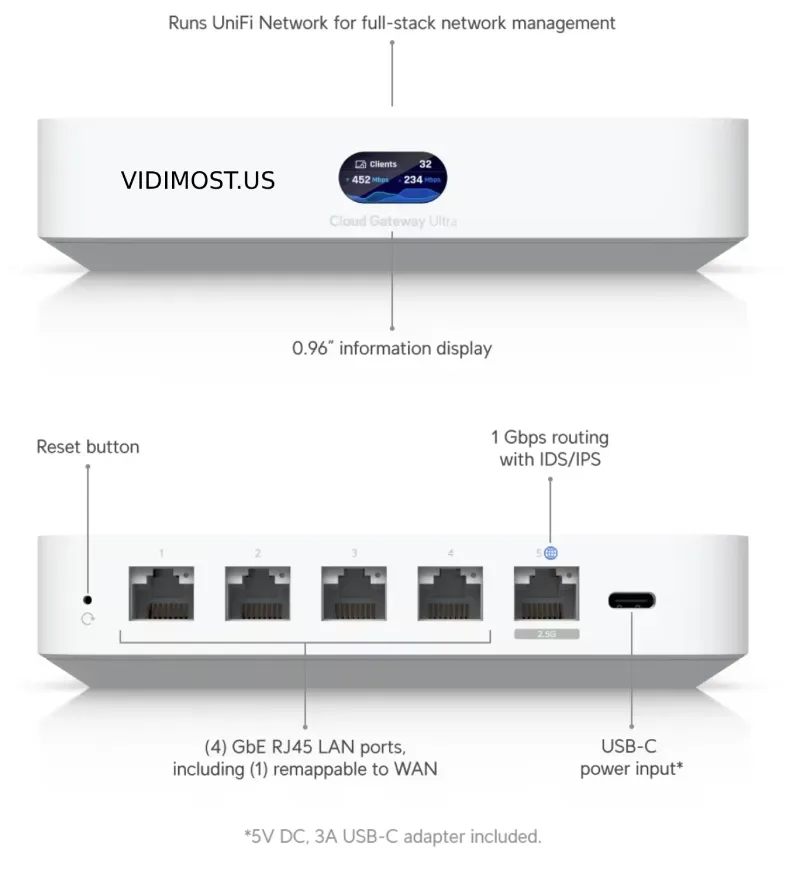
Baseline, minimum-sufficient professional option
Cloud Gateway Ultra is the best starting point for most homes and small offices that need a rock-solid Wi-Fi and internet network, without security cameras or door access control.
Best for:
- Homes and apartments in Chicago & suburbs
- Small offices focused on Wi-Fi reliability
- Multi-AP Wi-Fi systems
- VLAN-based network separation
Important limitation:
No UniFi Access (door access control)
No UniFi Protect (security cameras)
Professional insight:
Cloud Gateway Ultra is an excellent networking device, but it is not designed to run security systems.
Cloud Gateway Pro
Network + security cameras + access control
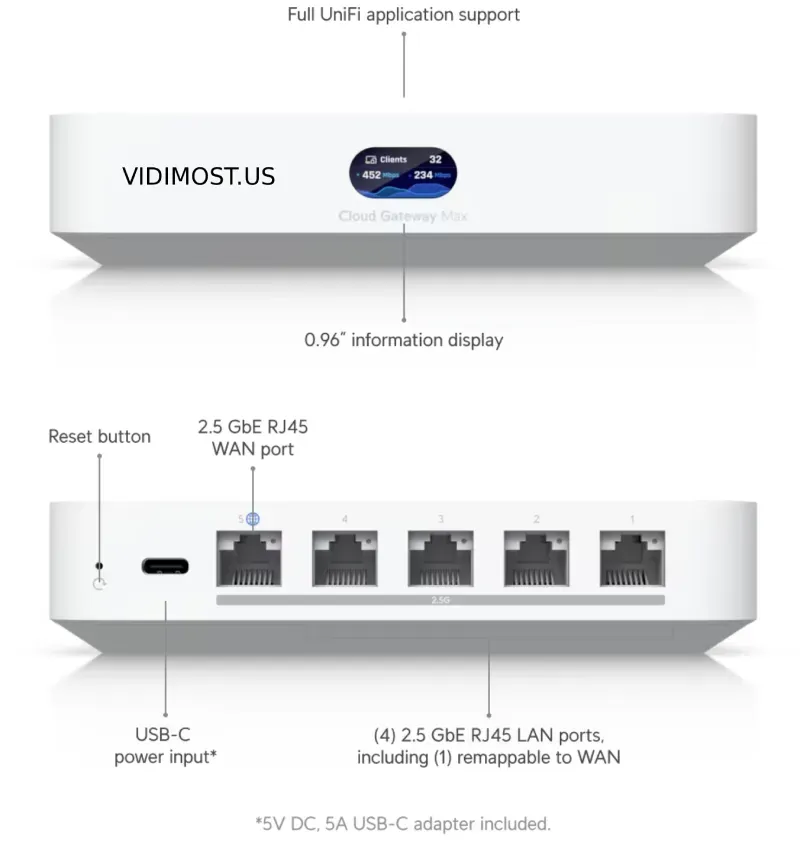
Cloud Gateway Pro is the most versatile choice for homeowners and businesses that want one unified system for networking and security.
Best for:
- Homes with outdoor or indoor security cameras
- Small offices with controlled doors
- Condos and mixed-use spaces
- Clients who want everything in one UniFi ecosystem
Key advantages:
- Supports UniFi Protect (video surveillance)
- Supports UniFi Access (doors, readers, intercoms)
- SSD-based local video storage
SSD options:
- Preinstalled: 512 GB / 1 TB / 2 TB
- Or bring your own SSD
Important note (often missed):
If you buy the version without an SSD, you must also purchase a separate M.2 SSD tray (about $20, sold separately).
Without this tray, the SSD cannot be installed.
Professional insight:
For most Chicago-area homes and small businesses with cameras, Cloud Gateway Pro is the best balance of price, performance, and future readiness.
Cloud Gateway Fiber
Designed for fiber internet and 10G infrastructure
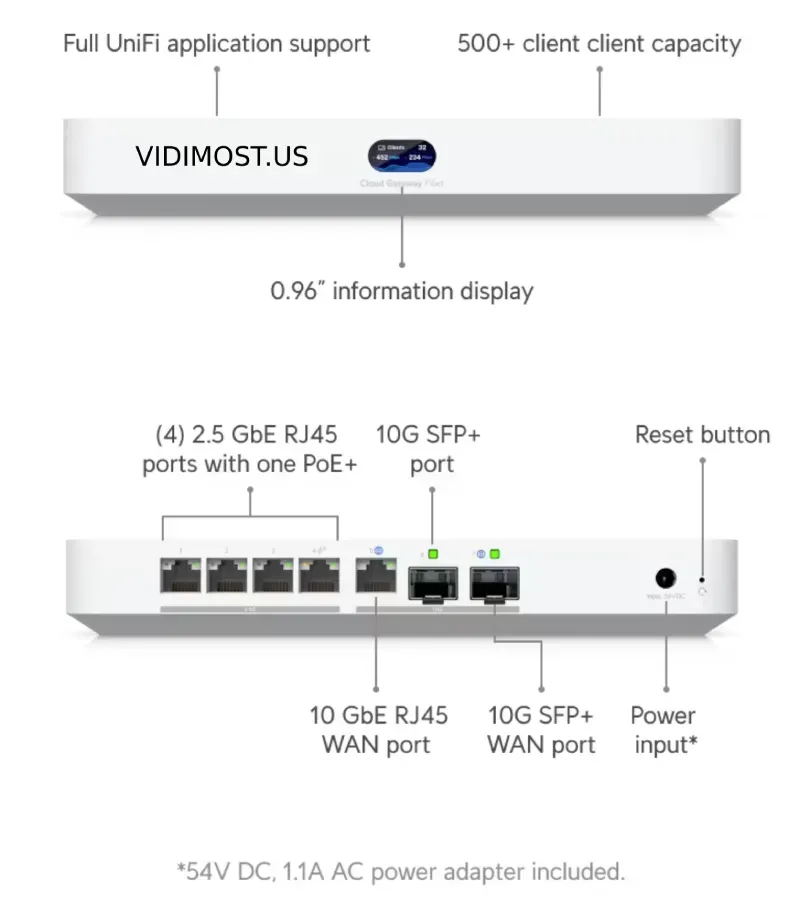
Cloud Gateway Fiber is ideal when fiber internet is already available or when you want a future-proof 10G network.
Best for:
- Fiber internet installations (direct SFP+ connection)
- High-end homes and modern office spaces
- Properties with NAS servers or large switches
- Clients planning long-term network growth
Key advantages:
- Direct fiber WAN connection (no media converter)
- 10G connectivity to switches or servers
- Supports cameras and access control
- Includes one built-in PoE port
Why the PoE port matters:
- Power one wired camera
- Or one access point
- Or one IP phone
Without buying a PoE switch or injector
Professional insight:
For many homes, a single PoE port is enough to keep the system clean and cost-effective.
| Feature | Ultra | Pro | Fiber |
|---|---|---|---|
| Professional UniFi Network |  | | |
| VLAN / VPN / Firewall | | | |
| Security Cameras (UniFi Protect) |  | | |
| Door Access Control (UniFi Access) | | | |
| SSD Video Storage | | | |
| Direct Fiber WAN | | | |
| 10G Networking | | | |
| Built-in PoE | | | (1 port) |
| Best Use Case | Wi-Fi only | Wi-Fi + Security | Fiber / 10G |
Frequently Asked Questions (FAQ)
Can Cloud Gateway Ultra handle large Wi-Fi networks?
Yes. Ultra is excellent for complex Wi-Fi deployments as long as cameras or access control are not required.
Can I add cameras later?
- Ultra: No
- Pro / Fiber: Yes, at any time
What is the best choice for a home with security cameras in Chicago?
Cloud Gateway Pro
It covers most residential and small business use cases.
Do I need a PoE switch with Cloud Gateway Fiber?
Not always. For small setups, the built-in PoE port may be sufficient.
Which Cloud Gateway is the most future-proof?
- No cameras planned → Ultra
- Cameras or doors → Pro
- Fiber internet or 10G plans → Fiber
Vidimost LLC specializes in professional network design, Wi-Fi systems, security cameras, and access control for homes and businesses across Chicago and surrounding suburbs.
With hands-on experience deploying UniFi systems in real environments — not just labs — we help clients:
- Choose the right Cloud Gateway from day one
- Avoid unnecessary hardware purchases
- Design networks that scale for 5–10 years
- Integrate Wi-Fi, cameras, and access control into one system
Professional advice:
Most clients who start with “Wi-Fi only” later add cameras or door access. Planning for that early saves time and money.
Need Help Choosing the Right Cloud Gateway?
If you’re located in Chicago, North Shore, or nearby suburbs and want a properly designed UniFi network, we can help you choose, install, and configure the right Cloud Gateway for your property.
Contact Vidimost LLC for a professional consultation and deployment strategy.
Comments ()