Configuring custom Wiegand formats in Paxton NET2
Learn how to configure custom Wiegand card formats in Paxton Net2 using Wiegand filters, parity checks, and bit rules. Practical steps for Chicago access control projects by Vidimost LLC.
Many access control systems still use Wiegand card formats, and a single credential can contain dozens of bits—sometimes up to 50 bits of data. The problem: Paxton Net2 doesn’t need all of those bits. To make cards behave correctly (and consistently across multiple doors/buildings), you often have to filter the incoming data, validate the site/facility code, and pass only the true card/user number into Net2.
In Chicago-area deployments—condos, HOAs, office/warehouse doors—this comes up constantly when you’re integrating legacy readers, mixed credential batches, or non-standard formats.
Vidimost LLC (Chicago & North Shore suburbs) configures and supports Net2 systems and reader integrations for buildings that need clean enrollment, accurate event logs, and reliable access decisions.
Why custom Wiegand filtering matters in Net2
Wiegand strings can include more than just a card number: site code (facility code), distributor codes, date codes, etc.
If Net2 reads the “wrong” portion of the data, you can run into issues like:
- cards being ignored by the reader/controller
- card numbers in Net2 not matching the printed card numbers
- risk of accidental overlap (different sites issuing cards that start at “001”)
- messy enrollment workflows for property managers
This is why knowing the exact bit layout of the credential format is critical—wrong rules can make setup painfully slow because the system may simply ignore the cards.
Net2’s two common options for Wiegand 26-bit cards
Net2 includes two “fixed” approaches for 26-bit cards (the most common starting point):
1) Wiegand 26-bit with a site code (recommended when possible)
This option lets you specify the site code when selecting the reader in the Doors screen.
It’s usually the best match for professional deployments where facility code consistency matters.
2) Basic “Wiegand 26-bit” (hybrid 8-digit Net2 number)
This mode combines site + user into a Net2-generated 8-digit number. It’s quick to set up, but often doesn’t match the printed card number, which can be unacceptable if the client wants enrollment by the number printed on the badge.
Chicago reality check: property managers frequently want enrollment by printed card number. So if hybrid numbering breaks that workflow, you’ll likely need filters.
Solution: Use Wiegand Filters in Net2 (Custom Rules)
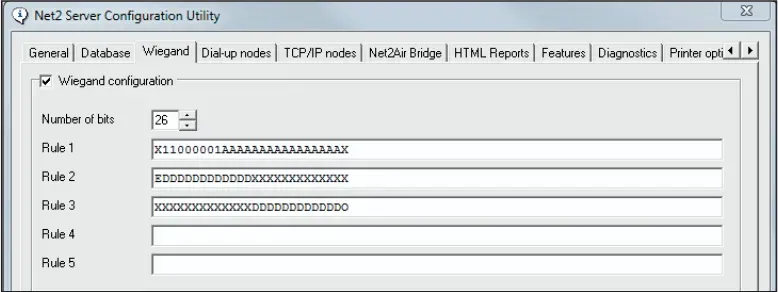
Net2 can accept other Wiegand formats by using filters defined in the Net2 Server Configuration Utility.
These filters let you:
- verify site/facility bits
- ignore irrelevant bits
- pass only the correct card number into Net2
Image placeholder #2: (Screenshot of “Net2 Server Configuration Utility” Wiegand tab)
Step 1 — Understand what’s inside the Wiegand string
A Wiegand card typically contains site code + user code, and may include extra codes depending on manufacturer.
Example: 37-bit layout (concept)
Here’s an example layout with spacing for clarity:
P= parity bit (one at each end)S= site code (8 bits)F= facility code (4 bits)A= card number (23 bits)
Image placeholder #3: (Your original diagram showing the 37-bit example)
Step 2 — Build a filter rule that checks the site code and passes the card number
In the sample case, the card includes:
- site code 193 (binary
11000001) - facility code 12 (binary
1100) - user number 1234 (23-bit binary string)
A strong Net2 approach is to verify the site code and pass only the card number to Net2. The rule pattern looks like this:
X= ignore0/1= must match (validated by controller but not passed to Net2)A= card number passed to Net2
Example Rule 1 (as entered in filter):
Q X11000001XXXXAAAAAAAAAAAAAAAAAAAAAAAX
Why site code checking is best practice: credentials are often issued starting at 001, so without a site code check, a random “001” from another batch could potentially be accepted.
Step 3 — Add parity checks (don’t skip this)
Parity bits help ensure the data is complete and accurate. Without parity validation, a corrupted read might deny a valid user—or worse, grant access under the wrong token identity.
Net2 parity checks are typically added as additional rules (commonly Rules 2 and 3) after you establish Rule 1.
Typical 26-bit parity patterns (example)
- Even parity rule pattern:
Q E DDDDDDDDDDDD XXXXXXXXXXXX X - Odd parity rule pattern:
Q X XXXXXXXXXXXX DDDDDDDDDDDD O
Image placeholder #4: (Your original “Parity checks” screenshot/section)
What happens after you create a custom format?
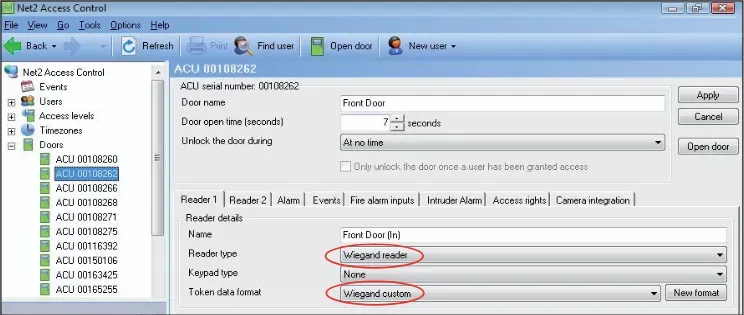
Once you enter a custom Wiegand filter in the Server Configuration Utility, Net2 will show a new token format option named “Wiegand Custom.”
Filter data is stored in each controller, and after changes you may need a Net2 server restart so the system updates properly.
Step 4 — How to discover an unknown Wiegand card format (practical method)
Manufacturers often tell you only the bit length (26/34/37/etc) but won’t reveal the internal layout or site codes.
A practical way to read and analyze tokens in Net2 is to temporarily set the door reader to a Desktop reader and present the token.
If it’s a 26-bit card
Set format to Wiegand 26-bit, present the card, and Net2 should display a Paxton-style number (commonly shown as 8 digits). Net2 ignores the two parity bits and effectively gives you a 24-bit value to convert to binary.
Example method:
- Take the displayed number (example:
13175734) - Convert decimal → binary using Calculator (scientific mode)
- Then split:
- first 8 bits = site code
- last 16 bits = card number
Example filter (26 bits) that checks site code and passes the card number:
X11001001AAAAAAAAAAAAAAAAX
If it’s more than 26 bits (example approach for 32-bit)
For longer formats, a useful technique is to read the data in two passes by changing which 24 bits are treated as “A” (passed) vs “X” (ignored).
Pass #1 (first 24 are A)
Q AAAAAAAAAAAAAAAAAAAAAAAAXXXXXXXX
Pass #2 (last 24 are A)
Q XXXXXXXXAAAAAAAAAAAAAAAAAAAAAAAA
Convert both results to binary and “stack” them to find the overlap and reconstruct the full bit string.
Then, if the physical card has a printed number, you can use it to confirm where the card number sits inside the full Wiegand string.
Allowing more than one site code (when needed)
Sometimes a property has multiple facility/site codes (common during transitions or when combining buildings). You can build a filter that matches shared bits and uses X only where codes differ.
Example concept:
- Code 70:
Q 1000110 - Code 71:
Q 1000111 - Filter match:
Q 100011X
Common mistakes we see on Chicago-area access control projects
- No site code validation → higher chance of unintended token overlap across batches/sites.
- Skipping parity checks → corrupted reads can create bad events or wrong token usage.
- Using “hybrid 8-digit” when client needs printed number enrollment → admin workflow pain.
- Guessing bit layout instead of confirming format → cards may be ignored.
If you’re deploying or troubleshooting Paxton Net2, integrating Wiegand readers, or trying to standardize enrollment across multiple doors/buildings in Chicago and the North Shore suburbs (Winnetka, Wilmette, Evanston, Skokie, etc.), Vidimost LLC can help you:
- confirm Wiegand bit formats safely and quickly
- configure Net2 filters and parity validation
- align enrollment workflow (printed number vs internal number)
- document site codes and credential rules for property management teams
Call/Text: (872) 254-5015
FAQ
Can Paxton Net2 read 34-bit or 37-bit Wiegand cards?
Yes—Net2 can accept non-26-bit formats by defining Wiegand filters (custom rules) in the Net2 Server Configuration Utility.
Why does my Net2 card number not match the printed card number?
This often happens when using the basic Wiegand 26-bit option that produces a Net2 hybrid 8-digit number instead of the printed credential number.
Are parity checks really necessary?
In professional deployments—yes. Parity checks help detect dropped/added bits and reduce the risk of corrupted reads causing wrong access decisions or incorrect event logs.
Comments ()