Configuring Wiegand 26-Bit Cards with a Site Code in Paxton Net2
A practical guide to configuring Wiegand 26-bit cards in Paxton Net2 using either the hybrid 8-digit token or “26-bit with site code” for cleaner enrollment—plus what to do when your card format isn’t standard.
Many access control systems still use Wiegand as the card data format. The most common version you’ll see in the field is Wiegand 26-bit, which typically contains a 16-bit user number plus an 8-bit site code (facility code). These credentials can be read by Paxton Wiegand readers and many third-party readers.
In Chicago and the surrounding suburbs (North Shore, Evanston, Skokie, Wilmette, Winnetka), this topic comes up constantly—especially when a building has older credentials, mixed batches, or multiple properties under one management company.
Overview: The two Net2 options for Wiegand 26-bit cards
Paxton Net2 provides two fixed formats for 26-bit Wiegand cards, and your choice impacts enrollment, reporting, and how clean the system feels for the client.
Option A — “Wiegand 26 bit” (hybrid 8-digit token)
This mode combines the site code and user code into a single hybrid 8-digit number for Net2 to use. It’s fast to set up—but the big drawback is that the number usually does not match anything printed on the card, which can frustrate property staff who want to enroll users by typing the printed card number.
When this is OK:
- The customer always enrolls by presenting the card (not by typing printed numbers)
- They don’t care about matching printed IDs
- You need the quickest working setup
Option B — “Wiegand 26 bit with site code” (recommended for professional deployments)
If you know the site/facility code used on the tokens, Net2 can be configured to check the site code first and then pass only the user number to Net2 as the token number—which should match the printed number on the card in many common deployments.
This approach is especially useful for Chicago condos/HOAs because:
- Staff can enroll faster (often by printed number)
- You reduce “duplicate-looking” card issues across sites
- The system behaves more predictably during audits and troubleshooting
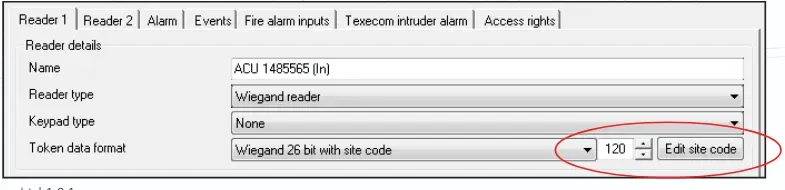
Image placeholder #2: Screenshot of Doors → Reader settings showing token format + “Edit site code”
Software settings: How to configure each option in Net2
If you want the hybrid 8-digit token number
Set:
- Reader type:
Wiegand reader - Token data format:
Wiegand 26 bit
This will produce Net2’s internal hybrid numbering.
If you want Net2 to validate a specific site code (facility code)
Set:
- Token data format:
Wiegand 26 bit with site code
Then click Edit site code and enter the site code in the popup.
Once set, click Apply.
Important detail: this site code is used system-wide. Any other readers configured with “Wiegand 26 bit with site code” will use the same configured site code.
What if your cards aren’t standard Wiegand 26-bit?
Not every building in Chicago is standard. You may encounter 34-bit, 37-bit, or proprietary formats. In that case, Net2 can still support those credentials using Wiegand custom format, configured in the Net2 Server Configuration Utility.
That’s where you define filters and rules so Net2 extracts the correct parts of the bit stream and ignores the rest.
Common mistakes we see in Chicago-area access control projects
- Using hybrid 8-digit numbers when the client expects printed card enrollment (creates admin friction).
- Not confirming site codes across multiple doors/buildings (causes confusion during card audits).
- Forgetting software version requirements (site-code option needs v4.21+).
If you’re managing a condo, HOA, office, or multi-site property in Chicago or the North Shore suburbs, Vidimost LLC can help you:
- identify your credential format and site code
- configure Net2 readers correctly (including custom Wiegand rules)
- standardize enrollment workflows for staff (present card vs type printed number)
- document everything so your building isn’t “stuck” with tribal knowledge
Vidimost LLC — Chicago Access Control & Security Systems
Phone/Text: (872) 254-5015
Comments ()