What Happens to Your Doors When the Power Goes Out?
Power outages in the Chicago area—especially during winter storms—raise a very practical question: “Will our doors unlock? Will tenants get stuck?
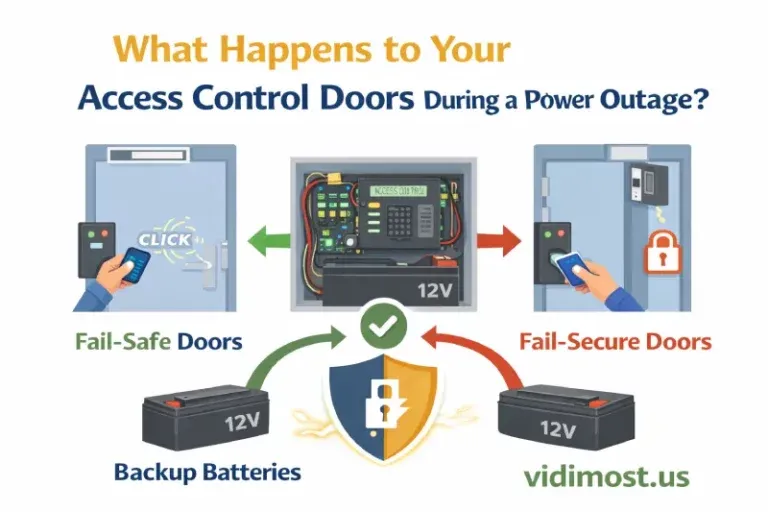
A Chicago-Area Guide to Access Control, Backup Batteries, and Fail-Safe vs Fail-Secure
Power outages in the Chicago area—especially during winter storms—raise a very practical question: “Will our doors unlock? Will tenants get stuck? Will the building stay secure?” The reassuring truth is that well-designed electronic access control systems are built for outages—but only when the door hardware selection, wiring, and backup power are done correctly.
Below is a clear explanation of what happens, why some doors unlock and others stay locked, and how to make sure your system performs reliably during a real Chicago winter outage.
The key concept: locks behave differently when power is removed
When the power goes out, a door’s behavior depends on whether the locking hardware is fail-safe or fail-secure:
- Fail-safe = the lock unlocks when power is lost (common with magnetic locks / maglocks).
- Fail-secure = the lock stays locked when power is lost (common with many electric strikes, depending on configuration).
This decision isn’t “one-size-fits-all”—it’s a balance between life safety (safe egress) and security (preventing unauthorized entry).
Very important: maglocks will open without power (if you don’t have backup)
Here’s the part many building owners don’t realize until it’s too late:
Magnetic locks require continuous power to stay locked.
So if your system does not have backup power (or the backup battery is old/failed), then during a power outage maglocks will release and the door will open/unlock—because the magnet cannot hold without energy.
That’s why for Chicago properties—especially perimeter or high-traffic entrances—battery backup and routine battery testing isn’t optional. It’s the difference between “secure during an outage” and “unlocked during an outage.”
Backup batteries: where they live and how long they should last
Most professional access control installations include backup batteries inside the control panel can and/or the lock power supply. This allows the system to keep operating when AC power drops.
What’s a “standard” standby time?
In many UL-oriented access control setups, you’ll commonly see requirements or guidance targeting at least 4 hours of standby power. For example, manufacturer compliance notes and installation manuals for UL-related applications often reference 4 hours minimum standby with appropriate batteries.
Real-world note: your actual runtime depends on load (how many locks, readers, and controllers are drawing power). A system with multiple maglocks will drain batteries faster than a lightweight setup.
Electric strikes: we can configure “locked on power” or “unlocked on power” (when required)
Electric strikes are flexible because many models can be set up as fail-secure (stay locked during power loss) or fail-safe (unlock during power loss), depending on the door’s requirements and safety strategy.
As professionals, we can configure electric strikes so that:
- the door stays locked when power is lost (security-focused), or
- the door unlocks when power is lost (when required for life safety, specific egress conditions, or an approved design).
The correct approach depends on the door type (entry vs egress), occupancy, and code requirements—this is exactly why proper design matters.
What you can expect during an outage (common scenarios)
Scenario A — Proper backup power + maintained batteries (best case)
- Doors keep working normally.
- Credentials still grant access.
- Building remains secure (based on fail-safe/fail-secure hardware choices).
Scenario B — Backup exists, but batteries are old or undersized
- System may “work” at first, then fail unpredictably.
- Maglocks may suddenly release once voltage sags.
- You may get nuisance issues (readers rebooting, intermittent unlocks).
Scenario C — No backup power at all
- Maglocks will release (fail-safe behavior).
- Fail-secure doors may remain locked from the outside (depending on hardware).
- You lose continuity and may lose logging/remote control during the outage.
Battery reality: they don’t last forever
Backup batteries are consumables. Even if the system “looks fine,” batteries age and capacity drops—especially if they’ve lived through multiple outages, high heat, or cold mechanical spaces.
Practical Chicago advice:
- Test batteries before winter (fall readiness check).
- Replace batteries proactively on a schedule (don’t wait for failure).
- Make sure your runtime meets your building’s needs (hours, not minutes).
Many power supply documents show standby calculations around 4 hours under specified loads/battery sizes—use those numbers as a baseline and size up if your site needs more resilience.
Why professional implementation matters (and why DIY often fails)
Access control isn’t just “install a reader.” The outage behavior of your doors depends on:
- lock type (maglock vs strike vs other electrified hardware)
- fail-safe vs fail-secure wiring/configuration
- battery sizing and charging supervision
- fire alarm/interface and egress requirements
- environmental considerations (Chicago winter readiness)
When the system is designed and implemented by professionals, it behaves predictably: secure when it should be secure, and safe when it must be safe. When it’s pieced together without a proper design, outages expose the weaknesses—often at the worst possible time.
Closing: Chicago-area help from a specialist
If you’re in Chicago or the suburbs and you want confidence that your doors will behave correctly during a power outage—especially with maglocks—I can help. I’m a security and access control specialist, and I focus on professional system design, correct fail-safe/fail-secure configuration, and backup power planning so your system performs the way it’s supposed to when the lights go out.
Visit vidimost.us to reach me for an access control audit, battery runtime evaluation, or a winter outage readiness test plan.
Comments ()