Why the Paxton Net2 “Pro” Controller Is So Popular (And Still Widely Installed)
If you’ve worked around real buildings—schools, offices, medical practices, warehouses, small businesses, and multi-tenant properties—you’ve almost certainly seen Paxton Net2.
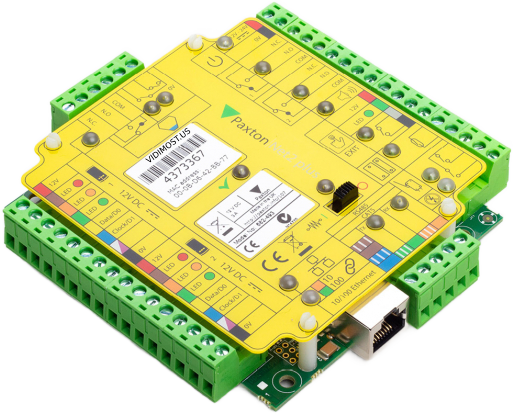
If you’ve worked around real buildings—schools, offices, medical practices, warehouses, small businesses, and multi-tenant properties—you’ve almost certainly seen Paxton Net2. It’s one of the most widely deployed access control platforms because it’s predictable, stable, and easy to scale.
A quick clarification: when people say “Net2 Pro controller”, they usually mean the combination of:
- Net2 Plus (the door controller hardware), and
- Net2 Pro (the advanced software tier)
Paxton states that Net2 originally launched in 1999, and it has remained in the market for decades because it was designed to make access control management simple.
Paxton also notes that Net2 Classic became unavailable (UK) in January 2014, with a transition toward Net2 Pluscontrollers.
This article breaks down why the Net2 ecosystem remains popular, how it works with readers (including third-party Wiegand), where it falls short (OSDP, mobile credentials, PoE), and why many integrators are watching the Net2 v7roadmap.
1) “It just works”: the longevity advantage
One reason Net2 is still everywhere is simple: it has a long track record in the field. Paxton’s own history of the platform emphasizes how widely adopted it has become since its original launch.
For many property owners and managers, “boring and reliable” wins:
- fewer surprises after commissioning
- straightforward service calls
- consistent replacement strategy (door-by-door upgrades)
2) Networked by design (LAN) — and flexible when you don’t have LAN everywhere
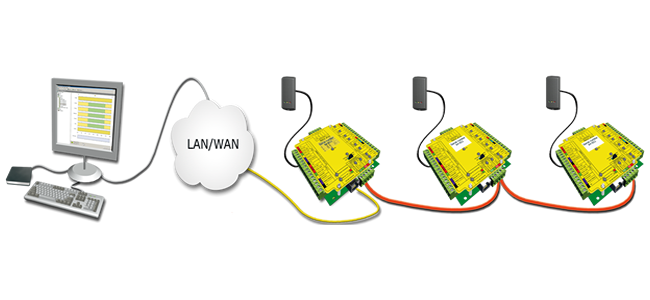
The Net2 Plus control unit connects to the administration PC over standard TCP/IP Ethernet using an RJ45 network connection.
But here’s the installer-friendly part: Net2 Plus also supports an RS485 data line, which allows controllers to be installed in a continuous daisy chain (loop in/out).
Paxton explicitly describes that Net2 Plus can connect to the Net2 PC using either TCP/IP (RJ45) or an RS485 data line—expanding installation options significantly.
Why this matters in real buildings
This hybrid approach is one of the most practical reasons Net2 stays popular:
- If you have LAN at some doors, you use LAN.
- If a door is far, expensive to cable, or in a tricky retrofit zone, you can extend the system using RS485 daisy chain.
- Adding “one more door” can be as simple as mounting another controller and tying into the existing RS485 line.
3) Single-door controller, but supports two readers (IN/OUT)
Net2 Plus is generally considered a single-door controller.
However, it can be configured with two readers—commonly used as Entry (IN) and Exit (OUT). Paxton documentation shows Reader 2 is typically labeled “(OUT)” by default and can be configured separately from Reader 1.
That’s a big practical win for:
- gates and parking (entry and exit control)
- doors where you want controlled re-entry/exit logging
- sites that want stronger accountability on both directions

4) Works with Paxton readers — and also with third-party Wiegand readers
A major reason Net2 is common in retrofit projects: reader flexibility.
Paxton positions Net2 as a networked system where each controller manages the door devices (reader, keypad, lock, exit button, etc.).
For many sites, that means using Paxton readers end-to-end. But in real buildings, you often inherit existing readers. In those cases, Net2 is frequently chosen because it can be integrated with third-party readers, especially when they output a compatible format (most commonly Wiegand). Paxton even publishes resources around third-party reader compatibility for Net2.
5) No monthly “subscription” pressure for everyday use
Many owners like Net2 because it’s fundamentally a PC-based, on-prem platform—not a cloud subscription that charges per credential.
Paxton describes Net2 as an advanced PC based access control solution and publishes that the software can centrally administer large sites (up to 1,000 doors and 50,000 users).
Paxton documentation also states that software upgrades are always free of charge, which reinforces the “long-life platform” value proposition.
In practice: once installed and licensed, Net2 can run for years without a recurring “per key” model.
6) The on-prem reality: you need a Windows PC/server (but doors can still run without it)
Net2 software is designed to run on a Windows PC.
Here’s the key operational detail that many people misunderstand:
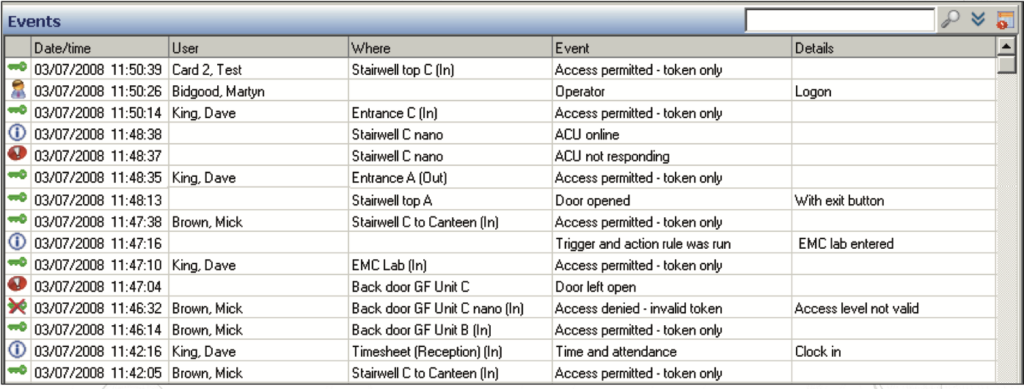
- The doors can keep running even if the PC is off, because Net2 uses distributed intelligence at the controllers. Paxton states the system does not require the PC to be on for the system to be running.
- But if you want live administration, monitoring, event reporting, and immediate updates, you generally keep the Windows PC/server on (or at least turn it on whenever you need to manage and update the system).
So the trade-off is clear:
- Pros: no cloud dependency, long-term ownership feel
- Cons: you own the responsibility of a stable Windows machine (updates, backups, reliability)
The trade-offs (what Net2 does not do well)
Con: No native OSDP reader protocol
Modern access control often prefers OSDP over Wiegand for security and advanced reader features. Net2 Plus installations are typically centered around traditional reader connectivity (commonly Wiegand), and OSDP projects usually push you toward a different platform or additional bridging hardware.
Con: Not a “multi-door panel” line
Net2 Plus scales as one controller per door, not as a single 8-door or 16-door panel.
Con: No native mobile credentials (“phone-as-a-key”)
Net2 is not designed as a mobile-credential platform in the way modern cloud/mobile systems are. Paxton’s Paxton Key mobile credentials are positioned under Paxton10, not Net2.
Net2 can have apps for remote management and for video entry workflows, but those aren’t the same thing as native mobile credentials.
(There are third-party solutions that can add mobile credential workflows, but that’s outside “native Net2 out of the box.”)
Con: No PoE on the base board (PoE requires a PoE expansion/kit)
Net2 Plus can be deployed with PoE using a PoE variant/expansion kit, but PoE isn’t inherently “built into every base board setup.” Paxton sells Net2 Plus options specifically packaged “with PoE” and describes PoE powering via a compatible PoE switch or injector.
Real-world impact: PoE is possible, but compared to controllers with built-in PoE as standard, it can:
- add parts and enclosure planning
- increase cost
- complicate inventory and service strategy
Comparison: Net2 Plus vs Other Popular Access Control Controllers
| Platform | Typical architecture | Doors per controller | Reader angle | Best fit |
|---|---|---|---|---|
| Paxton Net2 Plus + Net2 Pro | On-prem PC + networked door controllers | 1 door (often 2 readers IN/OUT) | Strong Wiegand/retrofit flexibility | Reliable retrofits, simple scaling, long-life installs |
| HID VertX EVO (e.g., V2000) | Enterprise-style controller ecosystem | Often up to 2 doors (model-dependent) | Enterprise integrations | HID-heavy standards, larger enterprise deployments |
| Kantech KT-1 | IP single-door controller | 1 door | Often chosen when modern reader features matter | When you want modern options in a simple footprint |
| Brivo (ACS series) | Cloud/hybrid with expansion boards | Multi-door panel style | Cloud-first ecosystems | When mobile/cloud workflows are core requirements |
Net2 v7: why many people are watching the update
Paxton has published that Net2 software v7 is planned for release in early 2026, and that future updates drive the push from Net2 Classic to Net2 Plus.
That is a strong signal that the platform is still alive, supported, and evolving—and Net2 Plus continues to be a reliable workhorse in the real world.
FAQ
Is “Net2 Pro controller” a real model?
Most people mean Net2 Plus (hardware) + Net2 Pro (software tier).
Can Net2 Plus be wired over LAN and daisy chained?
Yes. Net2 Plus can connect via TCP/IP Ethernet or via RS485 data line, and the RS485 line is installed as a continuous daisy chain.
Is Net2 Plus only for one door?
It’s typically treated as a single-door controller, but it can support two readers (commonly Entry/Exit)
Does Net2 require the Windows PC to be on 24/7?
The doors can keep running even if the PC is off (distributed intelligence), but you’ll want the PC on for ongoing administration, monitoring, and updates.
Does Net2 have mobile credentials like “phone as a key”?
Paxton’s mobile credential app Paxton Key is positioned for Paxton10 rather than Net2, so Net2 is not typically considered a native mobile-credential platform.
My name is Vitalii Verheles, Vidimost LLC. I work with access control systems across Chicago and the suburbs, including Paxton Net2 installs, troubleshooting, reader integrations (including Wiegand formats), and clean upgrades.
If you have questions—or a Net2 system that’s not behaving—reach out:
Email: [email protected]
Phone: (872) 254-5015
Comments ()